The glossary allows you to create a list of definitions in your knowledgebase.
Glossary items are highlighted in red in the article. If you hover your mouse over the glossary item, you see a question mark. If you click on the word, the definition is displayed in a grey box.
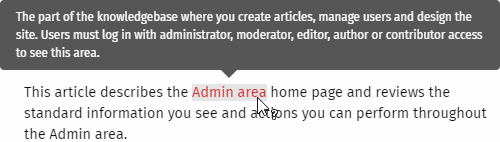
To hide the definition again, move your cursor away from the word.
Tip: If you wish to not highlight a word in an article, then when you update or create an article, highlight the required word and click  in the HTML editor.
This word will be skipped and not highlighted as a glossary term.


