The Email tab under the Settings controls who receives administration emails, and how the email is set up.
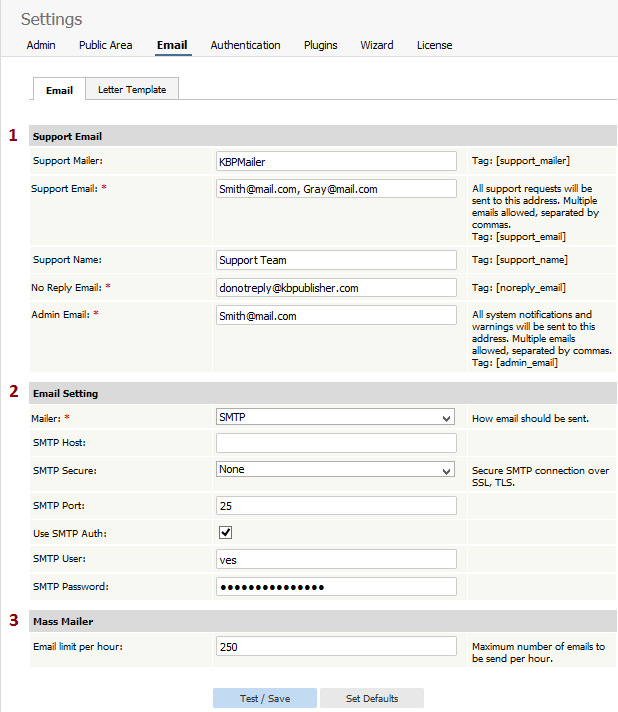
- The Support Email sections allows you to define system emails.
- Support mailer is the special email header
- Support Email is the email address, or addresses, where the administration emails are sent. Feedback emails are sent to this address. You can enter more than one email address. Separate each email address with a comma.
- Support Name is the name the user sees when they receive an email from KBPublisher. For example, if you reply to a feedback question, this is the name that will be shown in the reply field
- The No Reply Email is the email address that sends automated information such as subscription alerts, password enquiries and so on
- The person or persons assigned in the Admin Email receive system notifications, warning messages and other messages that impact the running of your knowledgebase.
- The Email settings are where you set up the mail system.
- The mailer is the system you are using to send the emails.
- This defaults to the PHP mail function unless you change it.
- The other items here are specific to the SMTP mailer, and should only be filled in if you have specified SMTP as the mailer.
- Sendmail defines the location of sendmail files. Sendmail is a UNIX based mail application. You would not normally change this.
- The Mass mailer controls how many emails, such as subscriptions, are sent by the background task scheduling system.
- Email limit per hour controls how many emails are sent per hour.


