Home Learn More Purchase Knowledge Base Support Contact

Search:     Advanced search

Export articles in Public Area

Article ID: 322
Last updated: 14 Apr, 2011

If you have purchased the export plugin, then you can set your knowledgebase up so that users can export a whole category of articles as a PDF document, or print it, from the Public Area.

To allow public export of articles

  • Purchase the export plugin and install it
  • On the Settings menu choose the Plugins tab
  • Check allow category exporting.

To generate a PDF file or print a category from the Public Area

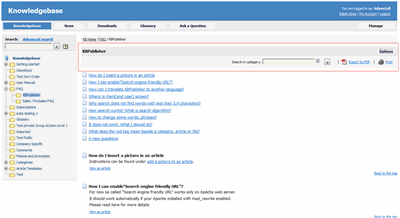
  • Once allow category exporting is set, users will find an Options button on their screen when they view a category

Export articles from public area

  • Click on the Options button
  • This opens a new options panel which allows a user to:
    • Search for items specifically within the category they are looking at
    • Create a PDF document
    • Create a printable html page.  This contains basic text without all the headings and left menu and right information block.
  • The information covers all articles in the category.  The user can then print or save this as required. 

---------------------------------------------------------
This functionality works in version 4.0 only

Article ID: 322
Last updated: 14 Apr, 2011
Views: 945
Comments: 0
This article was:  
Also read
document Enable exporting to PDF

Also listed in
folder User Manual v4.0 -> Changes for release 4.0 -> Exporting

Prev   Next
Generate PDF or HTML file from export template     Export articles in demo mode


© 2008 - 2012 Double Jade LLC | customer.service@kbpublisher.com