Ask a Question
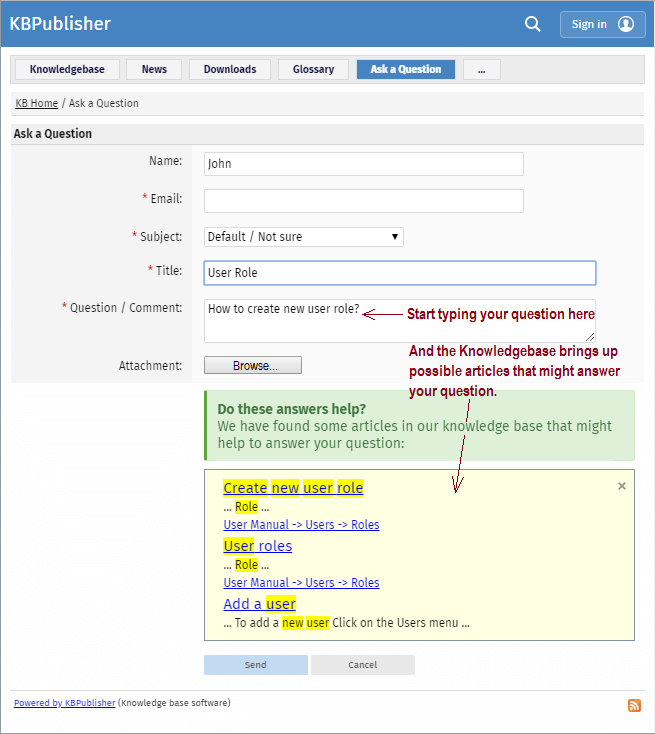
If you still cannot find the information, you can use KBPublisher's "Ask a Question" feature. As you type in the Question / Comment textbox, KBPublisher will display articles that might answer your question. If that list doesn't provide the answer you're after, click Send to email your question to the knowledgebase administrator. Questions can be targeted, too, so that questions will be sent to different users in your knowledgebase based on the item selected in the Subject dropdown box.
For more information on configuring recipients for Ask a Question submissions, see the following articles:
Quick Response
By "connecting" your contact form with your knowledge base, your visitors can get instant answers to questions that they would normally send you via email.
If a user clicks on Ask a question, when they start typing their query into the Question/Comments field, KBPublisher checks what they are typing and searches for articles that may answer the question.
It presents the five best matches at the bottom of the screen under a heading called 'Do these answers help?'
The five articles returned change as the user types more words.
Turning off quick response
This option can be turned off in Settings if you prefer a basic feedback form without this feature.
- Go to Admin Area
- Click on the Settings menu
- On the Common tab, under Feedback, uncheck Enable 'quick response'.


