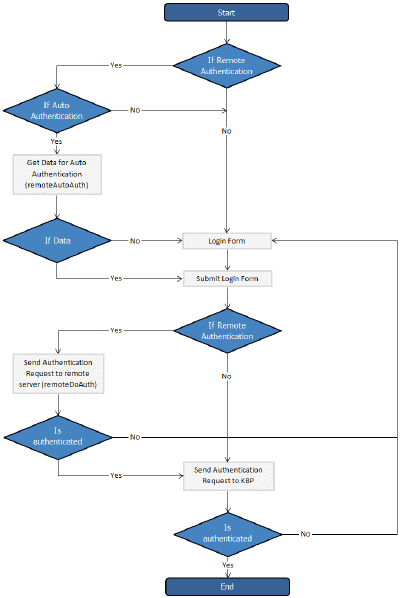
Remote authentication allows you to integrate your organization's authentication system with KBPublisher. Configuration requires only a few simple steps.
Before you start:
- We assume that you have some experience with remote authentication, with PHP, and with the system you are connecting to.
Steps to enable Remote Authentication
- Set the config variable $conf['remote_auth'] in the file admin/config.inc.php to 1
- Set required values for constants in file admin/lib/custom/remote_auth.php
- Customize the _remoteDoAuth function in the file admin/lib/custom/remote_auth.php to authenticate the username and password passed to it against your own authentication system
Quick summary of the process
- End User sends an authentication request by logging in to the knowledgebase
- Remote Authentication checks for valid user credentials
- KBPublisher authenticates the user .
Customizing the remoteDoAuth function
In your installation there is a folder admin/lib/custom. Within that folder is a file called remote_auth.php. This file contains the _remoteDoAuth function. Customize this function to do authentication against your internal system by using the username and password provided.
Here is a simple example of the function customized to authenticate against a MySQL database:
function remoteDoAuth($username, $password) {
$user = false;
$db = &DBUtil::connect($conf);
$sql = "SELECT 1 FROM ss_user WHERE username = '%s' AND password = '%s'";
$sql = sprintf($sql, $username, $password);
$result = &$db->Execute($sql) or die(db_error($sql, false, $db));
// if found
if($result->RecordCount() == 1) {
$user = 1; // assign a user id, this user id should exists in kb user table
}
return $user;
}